Phone
The child calls whom the parents listed, and nobody else can call or write. A stranger's call or text leaves one line in the log: no ring, no vibration, no notice.
Open source · ESP32-S3 · MIT
Phone OS is a complete operating system for a phone, open from the first line to the last: the firmware, the parents' web page, the simulator and every document, all under the MIT licence. It runs on a ready-made handheld with an ESP32-S3, an e-ink display, a 4G modem and GPS.
What a device does is its configuration. The first one built with Phone OS is an emergency phone for a child: it calls the family, reads and writes texts, sends its position at the press of a button, and nothing else.
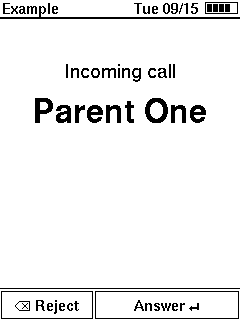
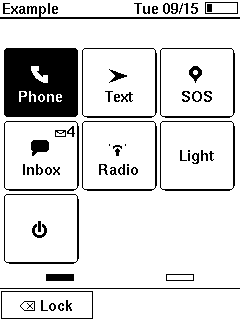
Every picture was drawn by the simulator from the firmware's own code. Press the keys as on the device, or tap the screen: the tiles, the rows and the buttons answer. The full demo adds what the keys do not lead to: a call coming in, school time, a flat battery.
Phone OS is not sold with a phone. You buy the device, download the code and flash it yourself over a USB cable. Four steps, no soldering.
A LilyGO T-Deck Pro MAX: a finished handheld in its case, with an ESP32-S3, an e-ink display, a 4G modem, GPS, a keyboard and a battery. Sold ready-made by its maker and by electronics shops; after flashing it is a phone, not a kit. It is the one device Phone OS runs on so far. Add a SIM card and a microSD card.
The device at LilyGODownload the repository from GitHub and install PlatformIO Core, a free command-line tool. That is the whole toolchain.
git clone https://github.com/paulwilke/Phone-OS.gitFormat the microSD card as FAT32, copy the three example files from config/examples/ into a folder /config/ on it, and write your contacts and settings into them: plain text, one line per entry.
Connect the device by USB and run one command. About a minute later the device starts with your card.
pio run -e device -t uploadPhone OS has no connection with LilyGO or with any shop; the T-Deck Pro MAX is the device the firmware was built and tested on. Other hardware needs its own platform code below the capabilities, and nothing above them changes.
The project claims only what was checked. Every change carries one of three marks, and the changelog says which.
It builds for the ESP32-S3. That is all this says.
The logic runs on a laptop against fakes of every chip, and the simulator plays whole scenarios through the real screens.
Seen on the real phone by the owner, with a date in the decision log. What the device taught is written down, and a lesson that changed the code gets its own decision.
The firmware and the simulator run the same composition of the same code. Only what lies below the capability interfaces differs: real chips on the device, scripted fakes on the laptop. That is why the pictures on this page are the device's pictures.
| Layer | Holds | May know |
|---|---|---|
src/hal/ | the capabilities: interfaces named after what the software needs (clock, modem, power, positioning, files) | nothing |
src/app/ src/ui/ | the application (contact book, school time, SOS, messages) and the pages | the capabilities only; never the hardware or a driver |
src/drivers/ src/board/ | the modem driver, the receiver parser, the chips of the device | the capabilities |
device/ | the firmware's platform code: the Arduino and ESP32 side of the seams | src/ |
sim/ testing/ | the simulator and the fakes of every capability | src/ |
A script checks the rules on every commit; a layer that reaches past its neighbour fails the build.
Set up as a child's phone, the device does a few things, each all the way: it calls only the contact book, drops everything from strangers without a sound, and stays quiet during school. The parents set it up from their own phone, in a browser.
The child calls whom the parents listed, and nobody else can call or write. A stranger's call or text leaves one line in the log: no ring, no vibration, no notice.
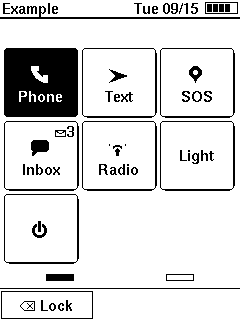
Six ready-made messages, shown in the child's language and sent in the parents'. Free text and new numbers only when the parents switch them on.
One button. A countdown of 40 seconds, then a text with the position goes to the parents; a call during the countdown does not cancel it.
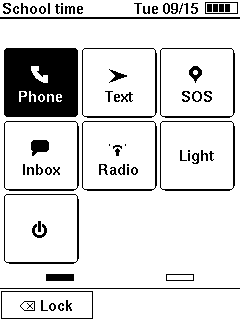
In the windows the parents set, the phone stays shut and every call is turned away without a ring. The parents see a missed call and can call back.
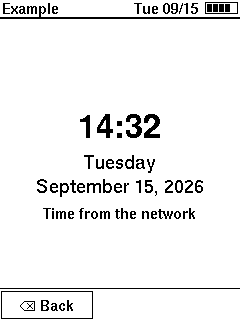
Contacts, school time, settings and the log, from a phone in a browser: over the device's own access point or over the USB cable. The page is served by the device itself.
The device switches itself off at 3300 mV and says so. A reading every ten minutes goes to an energy log; that log is how the gauge's own mistakes were found.
Every document is written from the code it covers, and every decision is written down with who made it and why.